Voxal Reinvents Virtual Backgrounds with Real-Time 3D Worlds
Meet Voxal's 3D virtual backgrounds: live environments that match your lighting, cast shadows, and can be recreated on another participant's device.
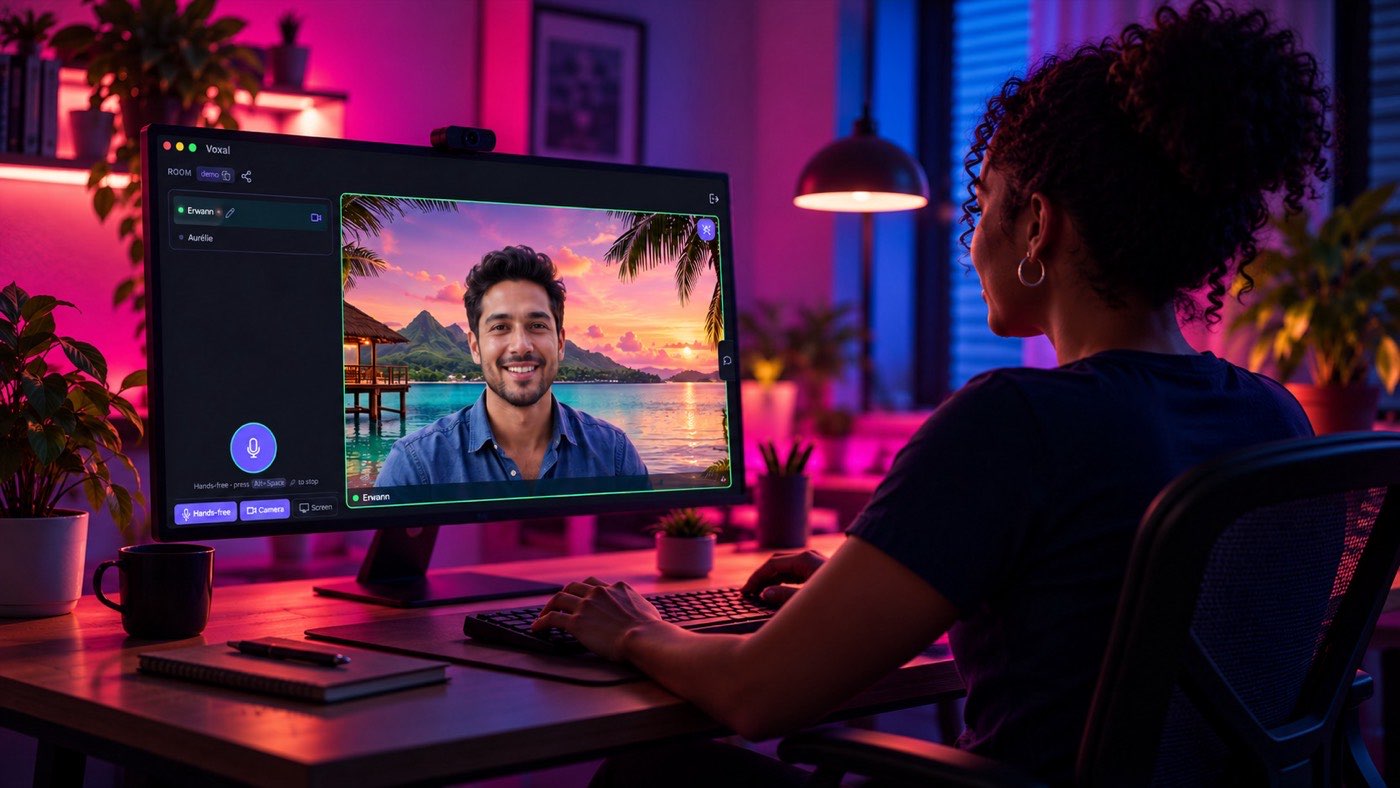
A virtual background usually starts with a simple idea: remove the room behind you, then replace it with a picture.
It works. But what if your background didn't have to be a picture at all?
What if it were a real-time 3D world, with its own lighting, reflections, movement, and atmosphere? What if it could match your lighting and, during a direct connection, your friends' devices could draw that same world themselves?
That is the idea behind Voxal's 3D virtual backgrounds.
Meet Voxal: push-to-talk without the overhead
Voxal is a push-to-talk app built around a simple principle: conversations should be easy to start, work across platforms, and avoid unnecessary infrastructure. You can create or join a voice room without an account, and the web app needs no installation. Voxal also has desktop and mobile apps, with noise suppression, microphone controls, a hands-free mode, video, and screen sharing.
Open a room, join your friends or teammates, and hold to talk when you want to speak. Prefer hands-free? That is available too.
Voice audio is always peer-to-peer. Voxal does not route your voice through a media server.
Video and screen sharing are separate. They can use direct connections or, in larger rooms depending on your settings, an optional video relay. Voice stays peer-to-peer either way.
This lightweight approach is part of what makes Voxal interesting: it is not trying to turn every conversation into a heavy meeting. And when you do turn on your camera, your background no longer has to be an afterthought.
A background that is more than a picture
Most virtual backgrounds follow the same recipe. Software finds the person in front of the camera, separates them from the room, and combines them with a still image or a video.
Voxal supports the familiar options too. You can leave your camera untouched, blur the background, or choose your own image.
The animated backgrounds work differently. Instead of playing a pre-rendered video, Voxal builds a three-dimensional scene and renders it in real time on your device. The scene is geometry, materials, light, and animation, not a movie playing behind you.
Voxal has six built-in scenes:
- Office: a Copenhagen architect's studio on an October morning, with low sun through a tall window.
- Island: the shaded deck of an overwater bungalow on a lagoon, with turquoise shallows and a leaning palm.
- Cyber café: a 90s internet café turned espresso bar in Lisbon, with azulejos and old terminals.
- Mountain: a glassy lake under limestone spires, with golden larches and mist on the far water.
- Countryside: golden wheat on rolling Tuscan hills on a June evening.
- Neon rain: a penthouse high over a harbour city at night, with rain on the glass and a mirror-polished floor.
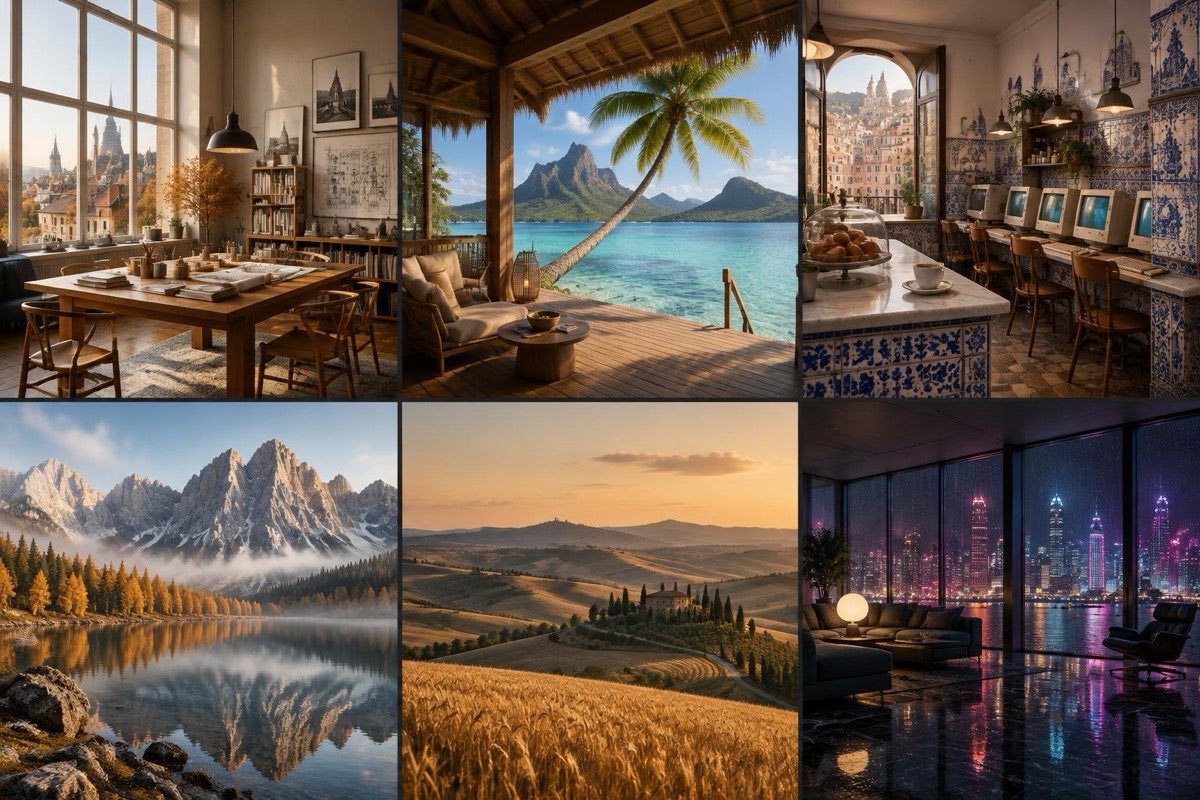
Each scene is drawn by your device's graphics hardware. The app does not need to ship background pictures or videos for them.
That changes more than the look. Because the scene is generated instead of played back, it can be relit, it can carry your shadow, and it can respond to movement. On a phone, the scene turns slightly as you tilt the phone.
Your background responds to you
A convincing virtual space needs to do more than look good. It should feel as though you belong in it.
Voxal's pipeline uses local person segmentation to separate you from the camera image. It then combines your silhouette with the rendered 3D scene.
It also estimates the light falling on you, and uses that to set the scene's exposure, colour tint, and light direction. The goal is one coherent picture: you and the environment share a similar lighting mood, instead of looking like two unrelated layers.
Your silhouette also casts a soft shadow onto the scene, which helps you feel part of the space.
If you prefer, you can choose the lighting yourself. Options include a fixed time of day (morning, mid-day, afternoon, evening, or night), the local clock, or your screen theme.
Bring your own world
The built-in scenes are only the starting point. In Settings → Video → Background you can add:
- A 360° panorama. Any equirectangular photo works, for example from a phone's panorama mode or a 360° camera. You stand inside it, and it turns when you drag the preview or turn your phone.
- A 3D model as a
.glbfile (the binary form of glTF), for example exported from Blender. Voxal uses the model's own camera, lights, and animations.
Custom scenes are stored locally on your device, not uploaded to a server, and you can keep up to 12 of them.
The clever part: your friends can render your background
In a conventional video call, the sender sends the finished picture: you, the background, and everything else combined in one frame.
Voxal has another option for its built-in scenes. When Let others draw my scene is on, and a compatible participant is connected directly to you, that person receives you over a flat green field instead of the finished picture. Their device finds the small corner markers in the frame, cuts you out, and draws the matching scene behind you.
In effect, two devices independently draw the same world.
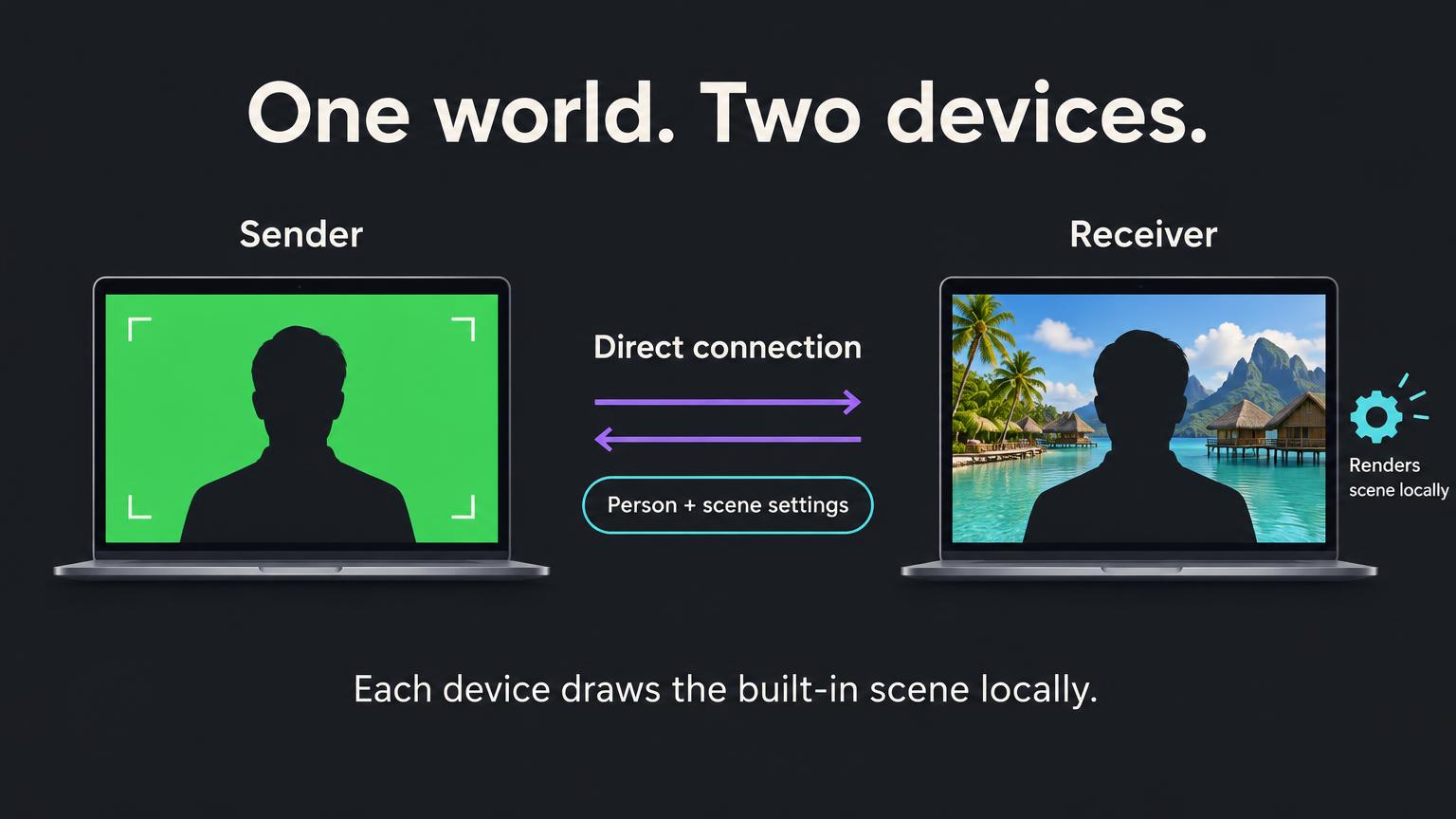
The setting is on by default, and you can switch it off in Settings → Video. It only acts when you have picked an animated scene and a compatible peer is connected.
Why does it matter? A flat field of colour is much cheaper for a video encoder than a detailed, animated scene. And the scene itself does not have to cross the network, because it is built from a few numbers: which scene, how bright, and where the light comes from.
What has been measured, and what has not
In controlled offline tests (VP9 at a fixed quality, 1280 × 720, 30 frames per second, with a moving stand-in subject), the composite over the built-in scenes cost about 130–287 kb/s, and the person over flat green cost about 96 kb/s. That is 26–67% fewer bits for the same quality.
Please read those numbers with their limits in mind:
- They come from offline tests with a stand-in subject, not from live calls.
- A real call does not run at fixed quality. Its encoder spends whatever bitrate cap it is given. In a live call, the benefit is a lower bitrate cap for the sender, and that has not been measured on a real call yet.
- The savings depend on the scene, the encoder, the connection, and the devices involved.
There are also limits on when this works:
- It needs a direct (peer-to-peer) video connection (see what peer-to-peer means). With the default routing, that means rooms of two people. When video goes through the relay (an SFU), the relay always gets the finished picture.
- The receiving device must be able to draw the scene: it needs WebGL2, a Chromium-based engine, and a hardware GPU. If it cannot, the sender keeps sending the normal finished video.
- If something goes wrong, such as a head covering a marker, Voxal also falls back to normal video.
- It does not apply to your own custom scenes, because nobody else has your file.
We make no claim about bandwidth compared with other products, because we have not measured any.
Designed to stay local
The image processing for your background happens on your device. A small machine-learning model runs locally through WebAssembly to find you in the camera feed. The background is drawn and combined with you before the video is sent. No camera frame is sent to a server to compute the background.
Your custom panoramas and .glb files stay in local storage on your device. They are not uploaded, and they are not shared with other devices.
You do not have to use any of this. With the background set to None, Voxal sends the raw camera stream and does not run the background pipeline at all.
One distinction is worth making clear. Voice audio always stays peer-to-peer. Camera video has its own routing options and may pass through an optional relay in larger rooms. A relay can technically see the video it forwards. This article describes how the feature is built. It is not a promise of absolute privacy, and the people on your call still see your video.
For developers: scenes are small programs
A built-in scene is one small module in the Voxal repository. Scenes must be deterministic (driven by time and a seeded random function), so that another device can rebuild exactly the same world from its name and a few numbers. The scene engine documentation explains the module format, and custom scenes covers the files you can bring yourself.
For users, that means more ways to personalise a call. For developers, it means a background can be a small, reproducible program instead of a large media file.
Try Voxal
You can use a simple blur, choose an animated 3D scene, upload an image, explore a 360° panorama, or try your own 3D model.
A virtual background does not have to be a static picture behind you. It can be a world your device creates, lights, and animates in real time, and, when conditions allow, a world the person on the other end creates too.
Voxal is open source under the MIT License. Features and platform support may vary by device and connection.